


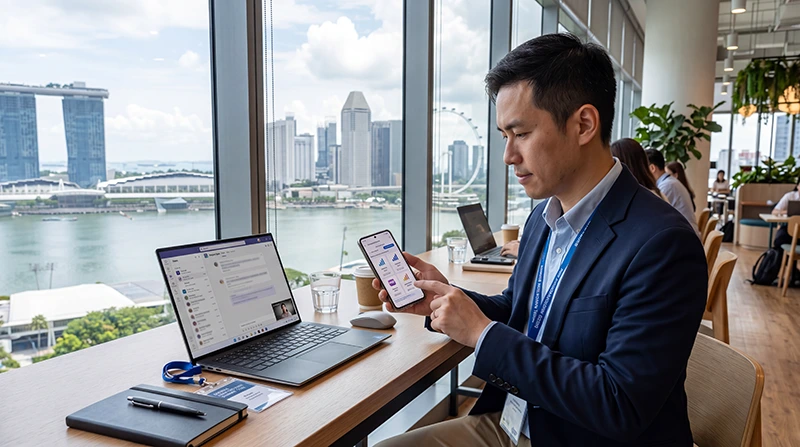

Business travel in Singapore depends on reliable mobile internet for meetings, email, video calls, conference apps, airport transfers, hotel communication, cloud documents, WhatsApp, Google Maps, Grab, and backup hotspot.
Choosing the right data plan helps you avoid running out of data during important work moments while also avoiding paying for more data than you actually need.
Quick answer: For most Singapore business trips, a data plan between 10GB and 30GB is usually suitable. Light business travelers may need less, while professionals using frequent video calls, hotspot, cloud uploads, or remote work tools may need 30GB+ or unlimited data.
Top Singapore eSIMs


Best Data Plan Options for Singapore Business Travelers
| Business Use Case | Recommended Data | Best For |
|---|---|---|
| Light business trip | 5GB – 10GB | Email, WhatsApp, maps, Grab, calendar updates |
| Standard business trip | 10GB – 20GB | Meetings, conference apps, moderate video calls |
| Conference or trade show | 15GB – 30GB | Event apps, networking, media, hotspot backup |
| Remote work trip | 30GB – 50GB | Video calls, cloud files, laptop hotspot |
| Heavy business use | Unlimited data | Daily hotspot, frequent video meetings, large uploads |
Why Business Travelers Need More Data Than Tourists
Tourists often use data for maps, messaging, rides, restaurants, and attraction tickets. Business travelers usually need all of that plus work applications.
- Email and attachments
- Microsoft Teams
- Zoom
- Google Meet
- Slack
- WhatsApp Business
- Cloud documents
- CRM systems
- Conference apps
- Laptop hotspot
- VPN access
- File uploads and downloads
Best Data Plan After Landing at Changi Airport
Many business travelers need mobile data immediately after landing at Changi Airport.
Mobile data helps with:
- Checking urgent emails
- Confirming meetings
- Opening hotel directions
- Booking Grab
- Checking conference schedules
- Accessing cloud documents
- Updating calendars
- Messaging colleagues or clients
A Singapore eSIM can be installed before departure and used after arrival without waiting in a SIM card queue.
Best Data Plan for Email and Messaging
Email, WhatsApp, Slack, and calendar apps usually do not use huge amounts of data unless you send or receive many large attachments.
For light business use, 5GB to 10GB may be enough.
This is suitable if your main activities are:
- Email replies
- WhatsApp messages
- Calendar updates
- Google Maps
- Grab rides
- Light browsing
Best Data Plan for Microsoft Teams
Microsoft Teams messaging uses relatively little data, but voice calls, video calls, and screen sharing can use much more.
If you expect several Teams meetings during your trip, consider at least 10GB to 20GB.
If you have daily video meetings or screen sharing, 20GB to 30GB+ is safer.
Best Data Plan for Zoom Meetings
Zoom video meetings can consume significant mobile data, especially with HD video, screen sharing, and long calls.
| Zoom Usage | Suggested Data Plan |
|---|---|
| Occasional short calls | 10GB – 15GB |
| Several meetings during the trip | 15GB – 30GB |
| Daily video calls | 30GB+ or unlimited |
Best Data Plan for Google Meet
Google Meet is commonly used by business travelers working with international teams.
Short voice or low-video meetings may not require large data allowances, but frequent video calls can quickly increase usage.
Choose a larger plan if you expect multiple calls per day.
Best Data Plan for Conferences in Singapore
Conference and trade show visitors often need more data than expected.
Mobile data is useful for:
- Digital tickets
- QR check-ins
- Event apps
- Networking messages
- Speaker schedules
- Venue maps
- LinkedIn updates
- Presentation downloads
- Backup internet when venue WiFi is crowded
For conferences, 15GB to 30GB is usually a comfortable range.
Best Data Plan for Laptop Hotspot
Hotspot use can dramatically increase mobile data consumption because laptops may sync files, update software, download attachments, or run background processes.
If you plan to use hotspot for laptop work, consider 30GB+ or unlimited data.
- Use hotspot for urgent tasks
- Pause automatic laptop updates
- Disable cloud sync while using hotspot
- Use WiFi for large downloads
- Use lower video quality during calls
Best Data Plan for Remote Work in Singapore
Remote workers usually need larger data plans than short business travelers.
If you are working remotely from hotels, coworking spaces, cafes, airport lounges, or business districts, mobile data can be an important backup connection.
| Remote Work Style | Recommended Data |
|---|---|
| Light work backup | 10GB – 20GB |
| Regular laptop hotspot | 20GB – 30GB |
| Frequent video meetings | 30GB – 50GB |
| Heavy cloud work | Unlimited data recommended |
Singapore eSIM vs Roaming for Business Data
International roaming may work if your corporate plan includes Singapore.
However, roaming costs, daily passes, data caps, speed limits, hotspot rules, and fair usage policies depend on your provider.
A Singapore eSIM gives you a separate travel data plan and can help you keep your primary SIM active for calls, SMS, banking, and authentication codes.
| Feature | Singapore eSIM | International Roaming |
|---|---|---|
| Separate business data plan | Yes | No |
| Install before travel | Yes | No extra setup if enabled |
| Cost clarity | Usually clearer | Depends on provider |
| Can keep primary SIM active | Often yes | Yes |
| Good for hotspot backup | Yes, if supported | Depends on plan |
Singapore eSIM vs Hotel WiFi for Business Travel
Hotel WiFi is useful for large files and longer laptop work sessions, but it only helps when you are at the hotel.
A Singapore eSIM is useful while moving between Changi Airport, hotels, meetings, restaurants, conference venues, and business districts.
| Business Need | Hotel WiFi | Singapore eSIM |
|---|---|---|
| Large downloads | Better | Possible but data-heavy |
| Airport transfer communication | No | Yes |
| Grab and maps | No | Yes |
| Backup during WiFi issues | No | Yes |
| Work between meetings | No | Yes |
What Uses the Most Business Data?
- Video calls
- Screen sharing
- Cloud backups
- Large file uploads
- Laptop hotspot
- Remote desktop tools
- Video streaming after work
- Software updates
- Conference livestreams
What Uses Less Business Data?
- Email without large attachments
- WhatsApp text messages
- Slack messages
- Calendar sync
- Google Maps
- Grab
- Basic web browsing
- Event schedule checks
How to Reduce Business Data Usage
- Use hotel or coworking WiFi for large downloads
- Disable laptop auto-updates on hotspot
- Pause cloud backup while using mobile data
- Use audio calls instead of video when possible
- Lower video meeting quality
- Download documents before leaving WiFi
- Close background apps
- Use hotspot only when necessary
- Avoid streaming in HD on mobile data
Can You Keep Your Primary SIM Active?
Yes. Many modern smartphones support dual SIM functionality.
You can use a Singapore eSIM for mobile data while keeping your primary SIM active for calls, SMS verification codes, banking messages, work authentication, and WhatsApp on your existing number.
To avoid unwanted roaming charges, keep data roaming disabled on your primary SIM and enable it only on the Singapore eSIM line.
Do You Need Data Roaming Enabled for Singapore eSIM?
Yes. Most travel eSIM plans require data roaming to be enabled on the Singapore eSIM line.
This does not mean you need to enable data roaming on your primary SIM. Enable data roaming only on the Singapore eSIM line if you use it for mobile data.
APN Settings for NoveSIM Singapore eSIM
| Setting | Value |
|---|---|
| APN | data.esim |
| Username | Leave blank |
| Password | Leave blank |
How to Activate Singapore eSIM for Business Data
- Choose your Singapore eSIM plan before your trip.
- Install the eSIM while connected to WiFi.
- Arrive in Singapore.
- Turn off airplane mode.
- Select the Singapore eSIM for mobile data.
- Enable data roaming on the eSIM line.
- Test internet with email, browser, Google Maps, and WhatsApp.
- Test hotspot if you plan to use it for laptop backup.
Business Data Troubleshooting Checklist
If mobile data does not work before a meeting or conference, check:
- Singapore eSIM is selected for mobile data.
- Data roaming is enabled on the eSIM line.
- Airplane mode has been refreshed for 30 seconds.
- Your phone has been restarted.
- APN is set to data.esim if manual APN is needed.
- VPN is not blocking traffic.
- You are in an area with good signal.
- Hotspot is not overloaded by laptop updates.
Do Not Delete Your eSIM First
If your business data connection does not work immediately, do not delete your eSIM first.
Some eSIM profiles cannot be installed again after removal. Check mobile data selection, data roaming, APN settings, airplane mode, restart, VPN, and network selection before deleting anything.
Before Your Business Trip to Singapore
- Check if your phone supports eSIM
- Make sure your phone is carrier unlocked
- Install your Singapore eSIM before departure if possible
- Download important work files in advance
- Save hotel and meeting addresses
- Save conference tickets or QR codes
- Estimate your data usage
- Confirm hotspot rules if needed
- Carry a power bank for long business days
Where to Find Your NoveSIM eSIM Details
Your NoveSIM QR code, installation instructions, and eSIM details are available:
- In your confirmation email
- Under My Account → Orders → View → eSIM details
Related Singapore Business Internet Guides
- Best eSIM for Business Travel Singapore
- Internet for Business Travel Singapore
- Remote Work Singapore
- Digital Nomad Internet Singapore
- eSIM for Conferences in Singapore
More Singapore Internet Guides
- Singapore eSIM
- Best eSIM for Singapore
- Mobile Internet Singapore
- Internet Singapore Tourists
- Unlimited Data eSIM Singapore
- How Much Data Do You Need for Singapore?
FAQ: Best Data Plan for Singapore Business Travel
What is the best data plan for a Singapore business trip?
For most business travelers, 10GB to 30GB is a good range. Heavy hotspot or video meeting users may need 30GB+ or unlimited data.
Is 10GB enough for business travel in Singapore?
Yes, 10GB can be enough for light business use such as email, WhatsApp, maps, Grab, and occasional meetings.
Is 30GB enough for business travel in Singapore?
For many business travelers, 30GB is comfortable, especially if they use video calls, conference apps, and occasional hotspot.
Do video calls use a lot of data?
Yes. Zoom, Microsoft Teams, Google Meet, and screen sharing can use significantly more data than email or messaging.
Can I use hotspot with Singapore eSIM?
Hotspot may be available depending on the eSIM plan and device. Check plan rules before relying on hotspot for laptop work.
Do I need data roaming enabled for Singapore eSIM?
Yes. Most travel eSIM plans require data roaming to be enabled on the Singapore eSIM line.
Can I keep my primary SIM active?
Yes. Many dual SIM phones allow you to keep your primary SIM active while using the Singapore eSIM for mobile data.
What APN should I use for NoveSIM Singapore eSIM?
If manual APN editing is available, use data.esim and leave username and password blank.
Final Recommendation
The best data plan for Singapore business travel depends on how much you use video calls, hotspot, conference apps, cloud tools, and large file transfers.
For light business use, 5GB to 10GB may be enough. For standard business travel, 10GB to 20GB is safer. For frequent meetings, conferences, remote work, and hotspot backup, 30GB+ or unlimited data is the better option.