


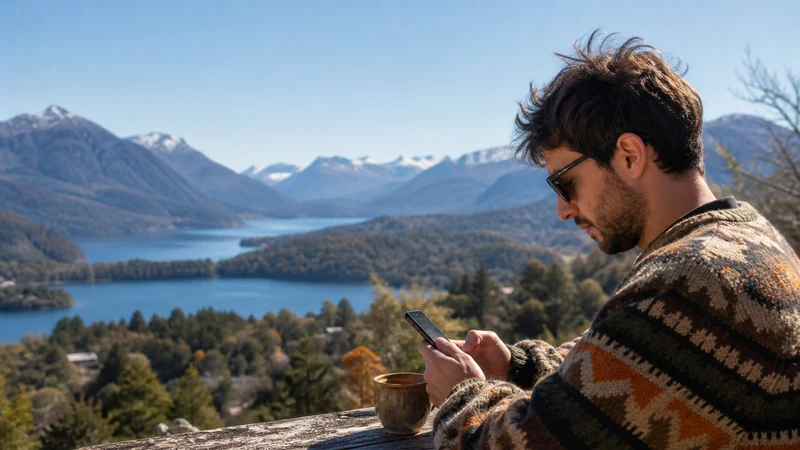

Digital nomads in Argentina should build their work setup around two independent connections: tested accommodation or coworking Wi-Fi and mobile data that can serve as a backup. Neither one should be assumed reliable without a practical test.
Buenos Aires offers the widest choice of workspaces, while smaller cities and remote regions require more advance checking. The critical questions are whether the connection remains stable during calls, whether hotspot use is allowed and how quickly work can continue after an outage.
NoveSIM Argentina plans are data-only. They do not provide an Argentine number, conventional calls or carrier SMS, although video meetings, messaging and internet calling can work over the data connection.
Quick answer: Book accommodation only after confirming recent Wi-Fi details, install mobile backup data before the first workday and test a real call from the actual workspace. Download essential files locally and never schedule a critical meeting around an untested rural or travel-day connection.
Top Argentina eSIMs

Argentina eSIM
Fixed
1 GB, 7 days€ 4.902 GB, 15 days€ 8.913 GB, 30 days€ 12.03Unlimited
Unlimited, 1 day€ 6.68Unlimited, 3 days€ 16.93Unlimited, 5 days€ 27.17
Use a Two-Connection Work Setup
Accommodation Wi-Fi is usually the primary connection because it does not consume the mobile allowance during long meetings or large transfers. A travel eSIM provides continuity when the router fails, the building loses service or work must continue during a transfer.
The two connections should not share the same point of failure. A phone hotspot is not a meaningful backup when the accommodation and phone both depend on weak coverage in the same location. Check the broader internet options in Argentina before deciding how the two layers will work.
Test Accommodation Wi-Fi before Important Work
A listing that says “fast Wi-Fi” does not reveal latency, evening congestion or whether the signal reaches the desk. Ask for a recent speed test from the room or apartment, but also confirm when it was taken and whether the host tested the same workspace.
- Run a video-call test at the time of day when meetings normally occur.
- Check upload performance, not only download speed.
- Walk between the router and desk to identify weak indoor coverage.
- Test the VPN and company authentication tools required for work.
- Ask how quickly the host can restart or repair the connection.
For high-stakes calls, a coworking day pass can be more dependable than hoping an apartment connection performs as advertised.
Choose Mobile Backup Data by Workload
Email, messaging and browser-based work use far less data than video meetings, cloud synchronisation and large media transfers. Review the phone and laptop’s recent usage before choosing an allowance. The Argentina data-planning guide provides practical ranges, but a remote worker should add a margin for unexpected Wi-Fi downtime.
| Work task | Planning concern |
|---|---|
| Email, chat and documents | Usually manageable on a modest allowance |
| Video meetings | Can consume data quickly and needs stable upload |
| Cloud backup | Should be paused or restricted to trusted Wi-Fi |
| Large design or video files | Schedule on a tested fixed connection |
| Laptop hotspot | Confirm tethering is permitted by the plan |
Before relying on tethering, read the Argentina eSIM hotspot guide. Operating-system updates and automatic photo backup should be controlled so they do not consume the emergency allowance in the background.
Coverage Changes outside Argentina’s Largest Cities
Urban coverage can still vary by building, floor and congestion, but it is generally easier to find alternatives in Buenos Aires and other large cities. Long-distance travel, mountain areas and Patagonia introduce larger gaps and fewer immediate backup options.
Compare the plan’s partner networks with the route using the Argentina coverage guide. For a workation that includes Patagonia, review the Patagonia mobile-data precautions and place important calls on days spent in tested towns.
Prepare the Phone and Laptop before the First Workday
- Confirm that the phone is unlocked and supports eSIM.
- Choose a plan whose allowance, validity and hotspot terms fit the workload.
- Follow the Argentina eSIM installation steps on reliable Wi-Fi.
- After arrival, select the travel line for data and enable Data Roaming when required.
- Connect the laptop to the phone hotspot and complete a short real-world test.
- Store essential documents locally and keep authentication recovery methods available.
- Carry a charger and power bank for travel days.
Keep Work Secure on Shared Networks
Use the legitimate network name supplied by the accommodation or coworking space. Keep the operating system and browser updated, use encrypted company tools and avoid bypassing browser certificate warnings. A VPN can protect work traffic when required by company policy, but it can also affect speed, so test it before a meeting.
Mobile data is useful for sensitive logins or as a fallback when a shared network behaves unexpectedly. If the eSIM has signal but no usable data, follow the Argentina troubleshooting sequence and keep the installed profile on the device.
Related Articles
- Argentina eSIM Plans
- Choosing an Argentina eSIM
- Mobile Networks in Argentina
- Argentina Road-Trip Internet
FAQ
Is internet in Argentina reliable enough for remote work?
It can be reliable in a tested accommodation or coworking space, especially in major cities, but quality varies. Confirm the exact workspace and keep an independent mobile-data backup.
How much data does a digital nomad need in Argentina?
It depends on how often mobile data replaces Wi-Fi. Email and documents are light, while video calls, cloud transfers and hotspot use can require 20 GB or more. Check recent usage rather than relying on a generic figure.
Can I use an Argentina eSIM as a laptop hotspot?
Only when the selected plan permits tethering. Check the current product terms and test the hotspot before an important work session.
Can I work while travelling through Patagonia?
Work from tested connections in towns, but do not depend on continuous service between them. Download files and schedule important meetings away from remote travel legs.
Final Recommendation
For digital-nomad internet in Argentina, combine verified workspace Wi-Fi with a separately tested mobile-data backup.
Choose the allowance and hotspot terms from the real workload, then test video calls, VPN access and laptop tethering before they become urgent.
Keep critical work in well-connected locations and treat remote travel days as offline-capable periods rather than promising clients uninterrupted coverage.