Aland Islands flag
Åland Islands eSIM

Best Aland Islands eSIM for Travel in 2026

Choose mobile data for your Åland visit using the destination-specific plans below. The current network panel lists Aalands Telekommunikation Ab and Telia Finland Oyj, both with 5G. Check the places where you need a connection rather than treating the listing as a guarantee across every island or ferry route.

We provide mobile data, not a local phone number, standard voice calls or carrier SMS. Use internet apps on an unlocked, eSIM-compatible phone. A Finland plan or a European package should not be assumed to include Åland merely because it names one of the same networks.

View Supported Networks for Aland Islands eSIM
Aalands Telekommunikation Ab5G
Telia Finland Oyj5G
★ 4.4/5 • Customer rating on Trustpilot
Åland mobile dataNo physical SIM card neededCompatible unlocked phonesKeep your WhatsApp number
Allowance and validity

Choose Data for Your Days in Åland

Compare both the data amount and expiry. The current Fixed range runs from 1 GB for 7 days to 50 GB for 30 days. Check what starts validity before installing or enabling the selected package, particularly if you are arranging it well before departure.

Important! 1GB of full high-speed data where available per 24 hours. Thereafter your data speed will be reduced and will reset on the next 24h period.

Start with messages, booking checks and maps, then allow for uploads or video calls. Include laptop sharing only after confirming hotspot permission; another device uses the same allowance.

Estimate data for your Åland stay →

The Unlimited options provide 1 GB of high-speed data where available per 24-hour period, followed by reduced speeds until the next reset. Unlimited does not mean unlimited high-speed data. A fixed allowance may suit larger transfers within one day better.

Continue your journey

Review Onward Stops as Separate Destinations

These cards open other products; they do not extend this Åland package. If your trip continues to Finland, Sweden or elsewhere, confirm the exact inclusion of each stop in the package you intend to buy.

Before purchasing

Check the Service You Actually Need

A Compatible Phone

Confirm eSIM support for your exact model and regional version. The phone must also be unlocked for another provider.

App Communication

Ask whether your host or other contacts use internet messages or ordinary calls. This data-only service does not supply conventional calling minutes.

Useful Validity

Choose a duration that covers the last day you need data, not just the first arrival. Read the package’s validity-start instructions before setup.

Destination Confirmation

For an alternative package, obtain explicit confirmation for Åland. A regional title, matching price or familiar network name is not enough.

Listed networks

Two Partners with 5G Listed

Aalands Telekommunikation

Aalands Telekommunikation Ab appears in the current supported-network panel with 5G. Review the live panel again when selecting your plan.

Telia Finland

Telia Finland Oyj is also listed with 5G. Its name does not establish that this Åland package includes every other destination served by the operator.

Conditional Access

5G access depends on the selected plan, device and local coverage. Neither listing guarantees a particular speed or reception at every property.

Island-Level Preparation

Check essential locations before relying on mobile data for an excursion. A working connection at one stop does not establish service across the rest of the archipelago.

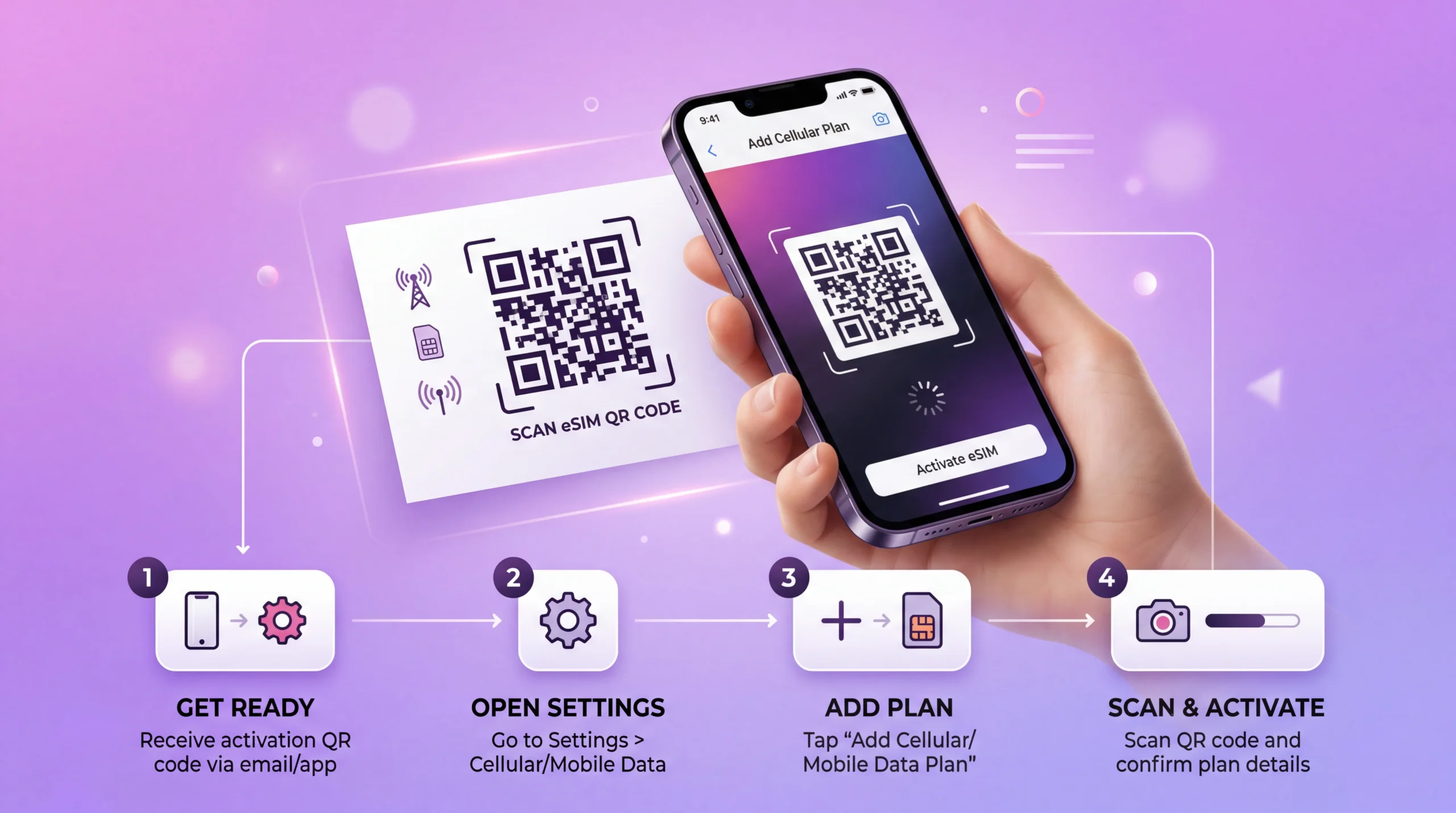
eSIM installation process showing QR code scan and activation on smartphone
Prepare before departure

Install According to Your Package Instructions

01

Confirm the Purchase

Check Åland as the destination, phone compatibility and any essential requirement before choosing the allowance.

02

Read the Timing Rule

Establish what starts validity. Receiving the profile, installing it and using mobile data are not necessarily the same event.

03

Use Stable Internet

Follow the supplied installation method at the permitted time. Keep the QR code and order information private.

04

Label the Line

Use a recognisable name such as Åland Data so you can distinguish the travel profile from your usual SIM after arrival.

Mobile-data settings

Test the Travel Line Where Signal Is Available

01

Find the Profile

Identify the installed travel eSIM in SIM settings using its label and supplied details.

02

Choose Mobile Data

When ready to use the package, enable the line and assign mobile data to it.

03

Apply the Roaming Instruction

Follow the travel eSIM’s data-roaming requirement. Keep home-SIM data roaming off if you do not intend to use that service.

04

Review Data Fallback

Check automatic data switching so a loss of travel-line signal does not silently move use to a chargeable home connection.

05

Load a Small Page

Turn Wi-Fi off briefly to test mobile data where supported signal is available. Follow the supplied settings or contact us if it fails; do not delete the installed profile unless support instructs you to.

Comparing another package

A Matching Network Is Not Proof of Åland Inclusion

The checked Finland product and European plans list some of the same operators, but that does not confirm the territory covered by each purchase. We do not present them here as verified replacements for this destination-specific plan.

What You FindWhat It EstablishesWhat Still Needs Checking
Åland destination productÅland is the named destination; two partners are listedReception at essential locations, package restrictions and validity
Finland product with overlapping operatorsIts own network panel and pricesExplicit confirmation that the selected offer includes Åland
Finland entry in a European packageFinland appears in that package’s destination listWhether Åland is included under those exact terms

Finland’s checked prices matched the equivalent Åland options, but price equality does not resolve inclusion. Europe Lite, Europe Extra and Europe+ did not show a separate Åland entry in the checked lists. Confirm the exact territory before buying an alternative, rather than inferring it from the operator name.

For a journey continuing beyond Åland, compare the full itinerary only after every required stop is confirmed. The same network listing also does not prove identical activation, hotspot or other package conditions.

Daily use

Keep Essential Travel Details Available Offline

  • Save accommodation directions and arrival contacts before departure.
  • Keep ferry bookings and the next departure time readable without mobile data.
  • Download maps for planned island visits while you have a working connection.
  • Use app messages and booking updates where supported reception is available.
  • Review automatic backups and downloads before they consume the allowance.
  • Count video calls and any permitted hotspot sharing separately from light browsing.
Calls and home roaming

Keep Your Other Line’s Charges Separate

  • WhatsApp can remain registered to your existing number while using travel data.
  • If you need ordinary calls or a local number, compare a service that explicitly includes them.
  • A compatible dual-SIM phone may retain your home line, but its calls and SMS follow your home provider’s terms.
  • Disabling home-line data roaming does not necessarily prevent call, SMS or voicemail charges.
  • Check Åland in your exact home tariff rather than assuming its roaming treatment from another destination.
Different parts of the journey

Plan the Connection Around Your Stops

Arrival and Accommodation

Have directions ready before reaching your first stop. Test the connection at the property before relying on it for essential work or calls through internet apps.

Island Excursions

Ask about important locations if reception will determine your purchase. A destination listing is not a guarantee of service on every island, road or beach.

Ferry Crossings

This is terrestrial mobile data, not onboard Wi-Fi or maritime service. Plan separately for connectivity during crossings and keep tickets and onward instructions offline.

FAQ

Åland Islands eSIM FAQs

Can I assume a Finland or Europe plan includes Åland?
No. The checked Finland and European products have overlapping operator listings, but those names do not confirm Åland inclusion. Europe Lite, Europe Extra and Europe+ did not show a separate Åland entry. Obtain explicit confirmation for the exact package before treating it as a replacement.
Which networks are listed for this Åland product?
The current panel lists Aalands Telekommunikation Ab and Telia Finland Oyj, both with 5G. Availability depends on the selected plan, compatible device and local coverage. A 5G label does not guarantee speed or reception everywhere.
Do we provide a local number or ordinary calls?
We provide mobile data, not a local phone number, standard voice calls or carrier SMS. Internet messaging and calling apps can use the connection. Your existing WhatsApp number can stay registered, while conventional home-SIM calls and messages retain that provider’s charges.
Will the plan work throughout every island and ferry crossing?
The destination and partner listings do not guarantee service at every location or at sea. Check essential stops before purchasing. This is terrestrial mobile data, not a ferry’s onboard internet service; keep tickets and directions offline.
Does Unlimited include unlimited high-speed data?
No. The Unlimited options provide 1 GB of high-speed data where available per 24-hour period, followed by reduced speeds until the next reset. Compare a fixed allowance for larger transfers and confirm hotspot permission before sharing with another device.
When should I install and start using the eSIM?
Read the installation timing and validity-start rule supplied with your selected purchase. Install on stable internet when permitted, then select the travel line for mobile data with its instructed roaming setting. Do not assume installation and the start of validity are the same event.
Choose for Åland

Match Your Data Plan to the Island Stay

Review the allowance, validity and listed partners for your visit. Confirm essential locations and any onward destination separately, then follow the purchased plan’s setup instructions and keep the next journey’s details offline.

Compare Åland Plans
Traveler using smartphone with global eSIM connection while traveling abroad
Scroll to Top