


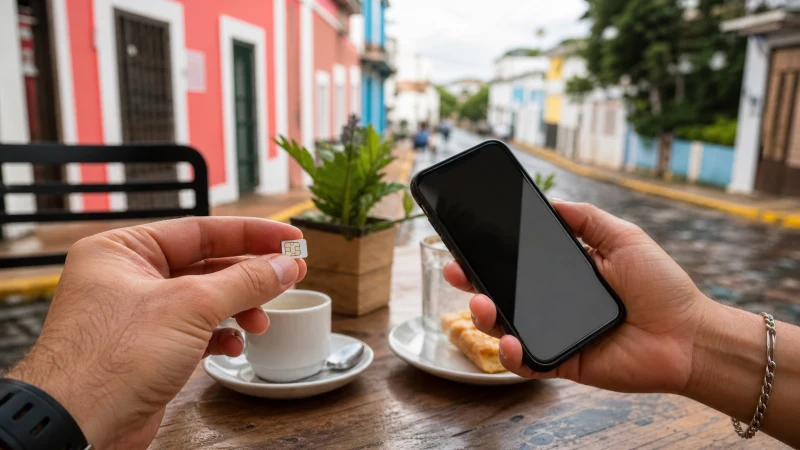

A Puerto Rican prepaid SIM can suit a long stay, while a travel eSIM avoids a shop visit and keeps the physical SIM slot available.
Price alone does not settle the question. When choosing between a local SIM and travel eSIM, account for setup time, validity, number requirements, shared devices and the parts of the itinerary where data is essential.
Our Puerto Rico data line supports navigation, reservations and internet communication but does not add a domestic number, standard calls or carrier SMS. Calling and messaging apps continue to work over data when their accounts are ready.
Quick answer: When choosing between a local SIM and travel eSIM, compare setup, validity, number needs, hotspot rules and allowance rather than choosing only by headline price.
Top Puerto Rico eSIMs

Puerto Rico eSIM
Fixed
1 GB, 7 days€ 3.552 GB, 15 days€ 6.223 GB, 30 days€ 8.00Unlimited
Unlimited, 1 day€ 3.55Unlimited, 3 days€ 8.89Unlimited, 5 days€ 13.77
What matters when choosing between a local SIM and travel eSIM
Install the eSIM on secure Wi-Fi and follow the activation timing shown with the purchased plan. Adding the profile and starting its validity are not always the same event. Make the final choice from the current plan terms and the places on the itinerary.
Label the new line Puerto Rico, keep the installation details accessible and avoid switching it on early by assumption. The order supplied with the plan should take priority.
For more Puerto Rico detail, see Local SIM vs eSIM in Puerto Rico: Which Is Better? and Which Mobile Network Is Best for Tourists in Puerto Rico?.
Include setup and arrival time
Related Puerto Rico resources include How to Install an eSIM for Puerto Rico Before You Travel and How to Select a Network Manually with a Puerto Rico eSIM.
Compare the same trip length, usable high-speed allowance, hotspot support and setup effort. A low headline price is poor value when validity or registration does not fit the itinerary.
International roaming is convenient but can be expensive; a local SIM may include a Puerto Rican number, while an eSIM avoids a shop visit. Pocket Wi-Fi can share one link but adds hardware and charging. Make the final choice from the current plan terms and the places on the itinerary.
Decide which line keeps the usual number
A connection that works outdoors but not inside one building points to local radio conditions. A line that never registers may need a settings check instead.
Move to an open area before rewriting configuration. Record what changed and contact support with the plan, handset and location details when the ordered checks do not restore data. This keeps one interruption from derailing the rest of the day’s route.
For more Puerto Rico detail, see Wi-Fi at Rafael Hernández Airport: An Arrival Guide and Internet in Culebra for Tourists.
Check allowance, validity and hotspot use
For more Puerto Rico detail, see Mobile Internet at Puerto Rico’s Beaches and Reliable Internet for Business Travel in Puerto Rico.
Airport shop hours, stock and prepaid registration can change. Verify the current outlet and ask about allowance, validity, activation and hotspot use before paying. The travel plan should still be workable when transport changes or reception returns later than expected.
A late flight or tight connection may leave too little time to compare bundles. Preparing an eSIM before departure removes that uncertainty without preventing a later local-SIM purchase.
Plan for coverage along the route
- Pause automatic updates, cloud backup and video downloads.
- Save the first address, booking reference and one useful contact.
- Confirm the exact handset is unlocked and supports eSIM.
- Keep installation details where another device can display them.
- Carry enough battery power for the longest planned transfer.
Confirm the final plan details on the live Puerto Rico eSIM page, including allowance, validity, supported networks and hotspot terms. More route-specific preparation is available through the Puerto Rico destination guide.
Know which connection checks are safe
If mobile data stops while choosing between a local SIM and travel eSIM, confirm signal, the enabled eSIM and the selected mobile-data line. Data Roaming should be on for the Puerto Rico eSIM and off for the home line. Allow automatic network selection to register, try aeroplane mode and one restart, then verify data.esim only if manual APN entry is required. Do not delete the eSIM unless NoveSIM support specifically requests it.
For a connection issue while travelling, more focused help is available in Can Tourists Use 4G and 5G in Puerto Rico?.
Choose by total convenience, not price alone
In practice, compare each option over the same number of travel days and include setup time, usable high-speed data, hotspot rules and number requirements. Home-network roaming offers convenience, a local SIM may include a Puerto Rican number, an eSIM can be prepared in advance, and pocket Wi-Fi adds another device to charge. The best value depends on the complete itinerary rather than price per gigabyte alone.
Related Articles
- Puerto Rico eSIM APN Settings: How to Use data.esim
- Slow Mobile Data in Puerto Rico? Practical Fixes
- Does WhatsApp Work in Puerto Rico?
- Mobile Internet for a Puerto Rico Road Trip
FAQ
What should be prepared first?
Begin by checking the phone and keeping the first address, booking and essential contact offline. Install on secure Wi-Fi and keep important details offline.
Does a Puerto Rico eSIM include a local number?
No. For this trip, remember that our Puerto Rico travel plans are data-only and do not include a Puerto Rican number, ordinary voice minutes or carrier SMS.
Where can I check the supported networks for Puerto Rico?
Open the exact live Puerto Rico plan before purchase. Use the selected plan’s live description for the latest network access and feature details.
Should the eSIM be removed if data stops?
No. When troubleshooting, check the active line, Data Roaming, network selection and APN data.esim first, then contact NoveSIM support before removing an installed profile.
Final Recommendation
When choosing between a local SIM and travel eSIM, compare the complete itinerary rather than one headline feature. Account for setup time, number requirements, hotspot use and the places where reception matters most.