


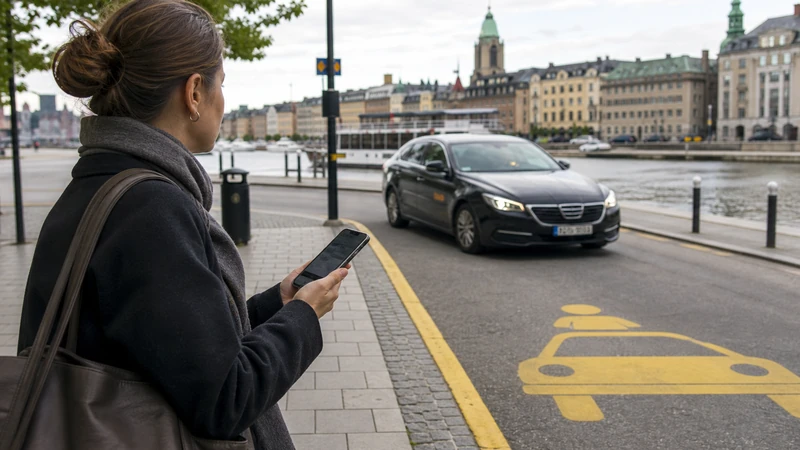

Ride-hailing availability in Sweden varies by city, time and operator, so an app should be treated as one transport option rather than a guarantee.
The Sweden travel plans available from NoveSIM focus on data connectivity. They support online communication apps but do not bundle a local number, voice minutes or standard texts.
Quick answer: Install the official apps before travelling, save essential information offline and use data on the journey eSIM for live updates rather than big app or media downloads.
Top Sweden eSIMs

Sweden eSIM
Fixed
1 GB, 7 days€ 2.222 GB, 15 days€ 3.553 GB, 30 days€ 4.44Unlimited
Unlimited, 1 day€ 2.22Unlimited, 3 days€ 5.33Unlimited, 5 days€ 8.44
Europe Extra eSIM
Fixed
1 GB, 7 days€ 2.222 GB, 15 days€ 3.553 GB, 30 days€ 4.44Unlimited
Unlimited, 1 day€ 2.67Unlimited, 3 days€ 5.33Unlimited, 5 days€ 8.89Europe+ eSIM
Fixed
1 GB, 7 days€ 2.672 GB, 15 days€ 4.003 GB, 30 days€ 5.33Unlimited
Unlimited, 1 day€ 2.67Unlimited, 3 days€ 6.22Unlimited, 5 days€ 10.22Install from the official store
Confirm the publisher and complete sign-in or payment verification before you leave. Avoid downloading lookalike apps from adverts or unofficial links. See our Sweden eSIM plans for the connected detail.
Prepare offline access
Save tickets, addresses and relevant map areas on the phone. Screenshots can be useful when an official ticket permits them, but follow the operator’s rules. See Sweden destination guide for the connected detail.
Manage permissions and data
Give location access only when it supports the app’s function. Restrict background refresh and automatic downloads when using a smaller travel allowance. See mobile-data guide for the connected detail.
Keep an alternative
An app can be unavailable, an account can lock or a service may not operate in every city. Preserve another transport, navigation or communication option. See data allowance guide for the connected detail.
Protect account access
Keep recovery email, authentication methods and the home number available where necessary. Do not switch the registered number in a messaging app merely because a data-only eSIM was installed; the app can normally continue using the existing identity over travel data. The related NoveSIM guidance is available in data allowance guide.
Check regional coverage of the service
An app that works in Stockholm may not provide the same routes or vehicles in a smaller city. Review the service area, operating hours and official support information for the actual destination instead of assuming national availability. The related NoveSIM guidance is available in tourist internet guide.
Watch battery use as well as data
Continuous location tracking and a bright navigation screen can drain the phone quickly. Download what can be stored offline, close unused ride or transport apps and carry charging support on longer sightseeing days. The related NoveSIM guidance is available in connection options.
App-specific preparation
- Service availability checked in the actual city and at the required time.
- Driver, vehicle and pickup point verified inside the official app.
- A licensed taxi or public-transport alternative kept ready.
- Location sharing limited to what the journey requires.
A ride-hailing result depends on the city, driver supply and time of day. Verify the pickup point, registration number and driver inside the official app before entering a vehicle. Do not accept an off-platform payment request or unexpected change of car. Keep a licensed taxi number or public-transport route ready, particularly for a late airport arrival.
A practical preparation checklist
- Confirm that the phone is unlocked and supports eSIM.
- Install and label the eSIM while connected to stable Wi-Fi.
- Select the travel line for mobile data and disable automatic data switching.
- Enable data roaming for the eSIM when the plan instructions require it.
- Download maps, tickets and essential contact details before remote travel.
Coverage, 5G and hotspot expectations
A dependable 4G signal is sufficient for directions, chats and travel bookings. Network access, 5G, hotspot use and performance depend on the purchased plan, the device, the region and coverage available at the time. Telia, Tele2 or Hi3G may be available through particular Sweden plans, but the information attached to the purchase should be followed.
Complete a final pre-departure review
Confirm these points again after any major phone update, plan change or itinerary revision, because the correct settings and allowance must still match the device and journey you will actually use. Before depending on an app, confirm the publisher, account access, payment method, service area and offline behaviour. Save important tickets or booking references in the form permitted by the operator. Keep the home number registered in messaging services unless there is a specific reason to change it; the data-only eSIM can carry the traffic. Review location and background-data permissions so the app is useful when open without continuously draining the allowance and battery.
Safe checks when data will not start
Verify that the eSIM is on, chosen as the cellular-data line and permitted to use data roaming when instructed. Apply a brief flight-mode reset, start the device again and use APN data.esim if the settings require manual entry. Do not remove the installed travel profile unless the NoveSIM support team specifically tells you to do so.
Related Articles
- Sweden eSIM Troubleshooting
- Data for a Sweden Trip
- Sweden eSIM plans
- Sweden destination guide
- Roaming Charges in Sweden
- Internet in Sweden for Tourists
- Ways to Get Internet in Sweden
- Mobile Data in Sweden
FAQ
What should travellers know before relying on this option?
Install the official apps during pre-travel preparation, save essential information offline and use the travel data connection for live updates rather than heavy downloads.
Does a NoveSIM Sweden eSIM include a local number?
No. Our travel eSIM plans are data-only. Compatible chat and online calling services work through data, but ordinary calls and SMS are not included.
Is 5G guaranteed throughout Sweden?
Automatic selection between 4G and 5G is normally the most practical setting. No. Availability varies with the plan, phone, location and local network.
Should I delete the eSIM if it stops working?
No. Complete the safe checks and contact our customer support team. Delete it only when support explicitly instructs you to do so.
Final Recommendation
Complete sign-in and payment checks, save essential references offline and restrict unnecessary background data before departure.
Official apps, completed sign-ins and offline copies of essential information keep the phone useful even when a service cannot refresh.