


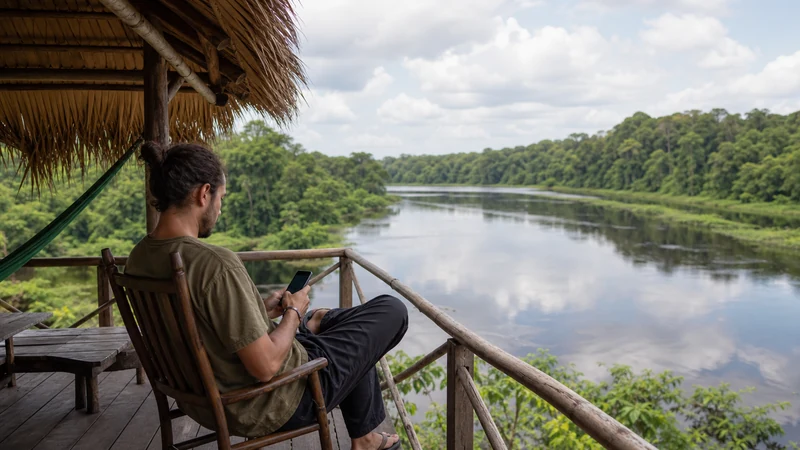

Mobile internet in the Brazilian Amazon changes sharply between large gateways, smaller communities, roads and river journeys. “The Amazon” is not one coverage environment.
Cities such as Manaus and Belém have established mobile infrastructure, while remote lodges, reserves and long boat routes may have limited or no terrestrial service.
Ask the accommodation or tour operator about the exact itinerary rather than relying on a city-level map.
Quick answer: A Brazil eSIM is useful in covered Amazon cities and towns, but do not expect continuous data on rivers or remote excursions. Download maps, bookings, permits, health information and emergency contacts before leaving the gateway city.
Top Brazil eSIMs


Gateway City vs Remote Excursion
| Travel stage | Connection plan |
|---|---|
| Manaus or Belém | Mobile data plus accommodation Wi-Fi |
| Smaller town | Check the exact supported network and address |
| River transfer | Assume intermittent or absent terrestrial coverage |
| Remote lodge or reserve | Confirm directly; keep the trip fully offline-capable |
Questions for the Tour Operator
- Which days and locations have mobile signal?
- Is lodge Wi-Fi available, and for what tasks?
- How are emergencies communicated?
- Are charging hours or sockets limited?
- What documents and cash should be carried offline?
Prepare Data and Power
Download route information, translation resources and entertainment before departure. Pause cloud backups and app updates. Keep a protected power bank and charging cable; heat, humidity and repeated signal searching can affect the device.
Do Not Confuse Data with Emergency Coverage
A consumer eSIM is not an emergency satellite service. Follow the operator’s safety procedures and never separate from the group based on an online map. If signal returns without data, check line selection and roaming; use data.esim only when required and do not delete the profile.
Define the Exact Amazon Itinerary
“The Brazilian Amazon” can describe a stay in Manaus or Belém, a road journey, a river transfer, a community visit, a remote lodge or a guided expedition. These are not interchangeable connectivity environments. Write the itinerary day by day before judging whether one plan is suitable.
List the gateway city, every transfer, overnight location and excursion. Ask the operator which segments normally have terrestrial mobile service, which rely on lodge Wi-Fi and which are expected to be fully offline. Recent local information is more useful than a general country map.
Gateway Cities: Manaus and Belém
Large gateway cities have established mobile infrastructure, accommodation and public Wi-Fi options, but indoor and neighbourhood conditions still vary. Use the city connection to complete downloads, confirm tours and prepare every remote segment before departure.
Save the port, airport, meeting point and accommodation addresses in full. A tour name alone may not identify the correct departure location. Keep the operator’s official contact and the agreed fallback process offline.
River Travel Has Different Coverage
A river route can leave terrestrial network coverage for long periods. Signal near a city, port or settlement does not predict the hours between them. Do not plan a live meeting, large upload or account recovery during a transfer unless the operator confirms a dependable connection.
Download tickets, route information, reading and entertainment before boarding. Keep the phone protected from spray and rain, and carry power appropriate to the journey. A consumer travel eSIM is not a maritime emergency communicator.
Remote Lodges and Reserves
Ask whether the lodge currently has Wi-Fi, where it works, when power is available and which tasks the connection can support. “Wi-Fi available” may mean a shared link in one common area rather than reliable room coverage or video-call performance.
Confirm how the property handles emergencies and communicates with transport providers. Do not make a safety-critical decision based on a consumer messaging app or assume that a mobile coverage map includes the lodge.
Questions to Ask the Tour Operator
- Which days and places usually have mobile signal?
- Which local networks are commonly visible?
- Does the lodge offer Wi-Fi, and where?
- Are power and charging available all day?
- How does the group communicate in an emergency?
- What documents and bookings must be carried offline?
- What weather or route changes can affect the connection?
- Is any specialist communication equipment provided?
Treat answers as current operational guidance, not permanent promises. Weather, maintenance and itinerary changes can alter the experience.
Prepare the Brazil eSIM in Advance
Confirm the exact phone is compatible and unlocked, then install the Brazil profile once on reliable private Wi-Fi. Label it clearly, read the activation trigger and protect the QR code. Do not attempt a first installation at a remote lodge.
After arrival in a covered gateway area, select Brazil for mobile data, enable Data Roaming and disable automatic switching. Keep network selection and radio technology on Automatic. Review Brazil eSIM installation before the trip.
Download an Offline Amazon Pack
- Maps for gateway cities and authorised routes.
- Flight, boat and transfer confirmations.
- Lodge and tour-operator contacts.
- Passport, permit and insurance information as appropriate.
- Medical information and personal emergency contacts.
- Translation resources.
- Entertainment for long transfers.
- The operator’s emergency and regrouping procedure.
Keep critical items on a second device or in print where practical. Do not rely on one phone, one battery or one cloud account for every travel document.
How Much Data for an Amazon Trip?
Maps, messages and booking checks in gateway cities are relatively light. Photo and video backup can be extremely heavy after excursions. Pause cloud uploads and complete them later on a verified, suitable connection.
A large allowance cannot compensate for no signal. Choose data for the connected portions of the itinerary and invest equal effort in offline preparation. Use How Much Data for Brazil for activity-based estimates.
Power Planning
Start remote segments with a full battery and carry reputable power banks within airline and operator rules. Confirm plug availability and charging hours at the lodge or boat. Keep cables dry and accessible.
Weak-signal searching, navigation, photography and hotspot use drain power. Use Airplane Mode during a deliberate offline period when no contact is expected, then restore the Brazil line before the next planned check-in.
Heat, Humidity and Water
Protect the phone from rain, spray, condensation and direct heat. Water resistance is not permanent waterproofing. Use an appropriate protective case or dry bag and do not charge a wet device.
Hotspot use and charging can add heat. Keep the phone ventilated and shaded, and stop heavy use if a temperature warning appears. Store the eSIM credential and backup documents in a dry, secure place.
Can You Work Remotely in the Amazon?
A gateway-city hotel may support ordinary work, but a remote lodge or river journey should not be assumed suitable for critical meetings. Ask about the exact current connection, shared capacity, power and backup. Email has different requirements from a live workshop or large upload.
If work cannot be postponed, schedule it in a tested gateway location and keep an alternative. Confirm hotspot support and follow Brazil eSIM hotspot guidance; do not depend on one consumer link for a fixed deadline.
Road Travel in the Amazon Region
Road coverage in northern states can differ sharply from dense urban corridors. Download the complete route, fuel stops, accommodation and roadside-assistance information. Tell a trusted person the route and expected arrival.
Use Brazil road-trip mobile internet for driver-specific safety. Never edit SIM or navigation settings while driving, and do not leave a safe vehicle blindly in search of signal.
Public and Lodge Wi-Fi Safety
Ask staff for the official network name. Avoid sensitive account changes on an unverified hotspot and never enter the eSIM QR code into a captive portal. Use HTTPS and a trusted VPN where appropriate.
A VPN protects traffic after connection but cannot make a fake access point legitimate. If the shared Wi-Fi is slow, postpone large uploads rather than monopolising limited local capacity.
If the eSIM Shows No Service
- Confirm that the current location should have terrestrial coverage.
- Move to an open gateway or inhabited area.
- Check that Brazil is switched on and selected for data.
- Enable Data Roaming on Brazil.
- Keep network selection on Automatic.
- Toggle Airplane Mode for about 30 seconds.
- Restart once and wait for registration.
Manual network selection cannot create forest or river coverage. Test only a partner supported by the exact plan and restore Automatic. Use Brazil eSIM coverage to distinguish a route gap from a settings problem.
If Signal Appears but Data Does Not
Turn Wi-Fi off and confirm Brazil remains the mobile-data line with Data Roaming enabled. Check the plan’s validity and remaining allowance. If a manual APN is required, enter data.esim exactly and leave unrelated fields unchanged.
Do not delete the profile. Follow Brazil eSIM troubleshooting in a location where service should exist and contact support with the exact device, place and safe screenshots.
Emergency Communication Is a Separate System
A travel eSIM is not a satellite SOS device, radio or guaranteed emergency channel. Follow the authorised guide’s procedures, remain with the group and respect route and community instructions. Learn the emergency plan before leaving a connected gateway.
Tell a trusted person the itinerary and expected check-in points. If specialist communication is needed, arrange it with the operator rather than assuming a mobile phone provides it.
Responsible Connectivity
Connectivity should support respectful travel, not distract from safety, wildlife or community rules. Ask before photographing people, follow protected-area guidance and do not leave a marked route to search for signal.
Limit large uploads on shared remote infrastructure and complete them later in a gateway city. Preserve battery and attention for navigation and communication that actually matter.
Related Articles
- Brazil eSIM plans
- Mobile internet in Brazil
- Brazil eSIM coverage
- Brazil road-trip internet
- Brazil bus internet
- Internet in Fernando de Noronha
- How much data for Brazil
- Best SIM card for Brazil
- Install a Brazil eSIM
- Activate a Brazil eSIM
- Brazil dual-SIM settings
- Brazil eSIM hotspot
- Brazil eSIM not working
- Slow Brazil eSIM
- NoveSIM Support
FAQ
Does an eSIM work in the Brazilian Amazon?
It can work where its supported partner has coverage, especially in gateway cities and some towns, but not throughout remote forest and river routes.
Will I have internet on an Amazon boat trip?
Do not assume continuous service. Ask the operator about the exact route and prepare for long offline periods.
Can I work remotely from an Amazon lodge?
Only after confirming the lodge’s current connection and a backup. Avoid scheduling critical work on a single unverified link.
What should I keep offline?
Save itinerary, bookings, permits, medical information, contacts, maps and the tour operator’s emergency process.
Final Recommendation
Define the Amazon itinerary day by day and confirm connectivity with the actual accommodation or tour operator. Install the Brazil eSIM in advance and complete downloads in a connected gateway city.
Use mobile data where supported, but prepare river routes, remote lodges and road segments for long offline periods. Protect power and equipment from heat, humidity and water, and postpone heavy uploads.
Keep safety independent of consumer connectivity. Follow the operator’s emergency procedure, remain with the group and treat the eSIM as a useful travel layer—not a satellite or wilderness guarantee.