


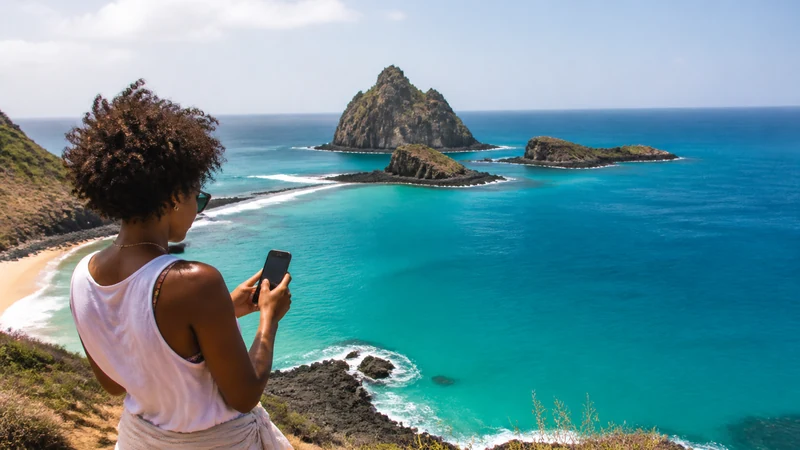

Mobile internet in Fernando de Noronha should be treated as an island convenience, not a continuous guarantee. The archipelago belongs to Pernambuco and combines inhabited areas with protected landscapes, beaches and boat activities.
Signal quality can change with terrain, distance, indoor construction and congestion. Accommodation Wi-Fi also varies and should not be assumed suitable for critical work.
Download everything needed for arrival and excursions before the flight.
Quick answer: A Brazil eSIM can provide data where its supported partner has island coverage, but expect variable service away from inhabited areas. Save maps, permits or bookings, transfer details and emergency contacts offline.
Top Brazil eSIMs

Brazil eSIM
Fixed
1 GB, 7 days€ 4.462 GB, 15 days€ 7.143 GB, 30 days€ 9.37Unlimited
Unlimited, 1 day€ 4.91Unlimited, 3 days€ 11.60Unlimited, 5 days€ 18.30
Where Connectivity Matters
Use mobile data for transfer messages, booking confirmations and navigation around inhabited areas. On trails, beaches, boats and remote viewpoints, assume that service may weaken or disappear. Do not delay an agreed meeting plan because a message appears undelivered.
Before Flying to the Island
- Install and test the Brazil eSIM settings.
- Download an offline map.
- Save accommodation and transfer contacts.
- Keep required visitor documents or confirmations offline.
- Download work files and entertainment in advance.
Data, Battery and Environmental Care
Repeated network searching drains battery. Use Airplane Mode when deliberately offline and carry a power bank, while respecting local rules for protected areas. Pause automatic photo and video backup; upload later on a verified connection.
If the Signal Is Weak
Move to an open inhabited area and leave network selection on Automatic. Manual selection cannot create coverage. If signal exists without internet, check the data line and roaming; use data.esim only if required. Do not delete the eSIM.
Plan Coverage by Part of the Island
Fernando de Noronha is an archipelago, not one uniform mobile environment. Inhabited areas, accommodation, roads, beaches, trails, viewpoints and boat routes have different terrain and distance from infrastructure. A connection near the accommodation does not predict service at every attraction.
Ask the property or tour operator about current signal at the exact location and along the activity route. Avoid a blanket claim that one operator or eSIM works everywhere. Coverage maps are useful estimates but cannot represent every slope, building or coastal shadow zone.
Prepare the eSIM Before the Island Flight
- Confirm the exact phone is unlocked and eSIM-compatible.
- Install the Brazil profile once on dependable private Wi-Fi.
- Label it Brazil and keep the QR code private.
- Read the activation trigger and validity.
- Select enough allowance for the complete Brazil itinerary.
- Save support and order information offline.
Do not wait until the island arrival to discover a compatibility or carrier-lock problem. Use Brazil eSIM installation before departure and keep the profile installed even if it cannot register outside Brazil.
Save Visitor Documents and Bookings Offline
Keep flight details, accommodation, transfer contact, tour confirmations and any current visitor or park documentation available without internet. Requirements and access rules can change, so verify them through official sources shortly before travel and save the final versions.
Do not rely on an email inbox loading at a checkpoint or meeting point. Store an offline copy on the phone and, for essential documents, a second device or printed backup.
Arrival and Transfer Connectivity
Save the full accommodation name, address or location reference and transfer arrangement before the flight. If a host or driver is meeting you, agree on a fallback point and waiting procedure in case messages do not arrive.
After landing, switch on Brazil, select it for mobile data, enable Data Roaming and disable automatic switching. Keep network selection on Automatic and test a simple webpage with Wi-Fi off once the phone has had time to register.
Mobile Data Around Inhabited Areas
Use mobile data for accommodation messages, bookings, navigation and transport where the supported partner has service. Indoor construction and local terrain can still weaken signal. Move to an open area before treating one room’s poor service as a plan failure.
Download the island map even when the arrival connection works. The map is most valuable when the phone later reaches a beach, trail or road section with limited service.
Beaches, Trails and Viewpoints
Assume that a trail or beach day may include long offline periods. Set the meeting place and return time before leaving, carry the required supplies and follow local access and safety rules. Do not separate from a group because an online map appears to show a shortcut.
Store the phone securely when swimming or moving over wet terrain. Water resistance can deteriorate and is not the same as waterproofing. Use an appropriate case or pouch and do not charge a wet device.
Boat Trips and Offshore Coverage
Terrestrial mobile service should not be assumed offshore. Ask the authorised operator how communication and emergencies are handled. The crew’s procedure, safety equipment and instructions matter more than the traveller’s consumer phone plan.
Keep the phone protected from spray and direct sun. Record photos offline and postpone uploads. A consumer eSIM is not a satellite communicator or maritime emergency service.
Accommodation Wi-Fi Can Vary
Ask the property about current Wi-Fi coverage, not merely whether Wi-Fi exists. A connection may be available only in common areas, may slow during busy periods or may not support video meetings and large uploads.
Verify the official network name with staff. Avoid sensitive account changes on an unverified hotspot and never upload the eSIM QR code to a captive portal. Use mobile data as a backup where coverage exists.
Can You Work Remotely from Fernando de Noronha?
Remote work is possible only when the specific accommodation and mobile location have been tested for the required task. Email and documents need less stability than a live workshop or large file transfer. Do not schedule a critical meeting on the assumption that an island holiday connection will behave like a city office.
Confirm whether the exact plan permits hotspot use, pause laptop updates and keep a backup plan. Read Brazil eSIM hotspot guidance and identify a verified alternative connection before accepting a fixed deadline.
How Much Data for the Island?
Maps, messages and booking checks are relatively light. Photo and video backup can be very heavy, especially after a full day of excursions. Pause cloud uploads on mobile data and use trusted accommodation Wi-Fi later.
Choose the allowance for the full Brazil trip rather than the island alone. Use How Much Data for Brazil and check validity, fair-use and hotspot terms on the exact product.
Battery, Heat and Charging
Weak-signal searching, navigation, photography and direct sun can drain and heat the phone. Start each excursion with a full battery, carry a reputable power bank and keep the device ventilated and shaded.
If the phone displays a temperature warning, stop charging and heavy use. Airplane Mode can preserve battery during a deliberate offline period, but remember to restore the Brazil line before the agreed contact or return time.
Environmental and Community Considerations
Follow current protected-area rules and tour guidance. Connectivity should not encourage a traveller to enter restricted areas, disturb wildlife or leave a marked route for a signal. Download information before the activity and keep attention on the environment.
Ask before photographing people or using accommodation and community connections for large uploads. A respectful low-data plan is often more appropriate than treating limited local infrastructure as an unlimited personal resource.
If the eSIM Shows No Service
- Move to an open inhabited area.
- Confirm that Brazil is switched on.
- Select it for mobile data.
- Enable Data Roaming on Brazil.
- Keep network selection on Automatic.
- Toggle Airplane Mode for about 30 seconds.
- Restart once and wait for registration.
Manual selection cannot create island coverage. Test only a partner supported by the exact plan and restore Automatic. Check Brazil eSIM coverage before concluding that the profile has failed.
If Signal Appears but Data Does Not
Turn Wi-Fi off and verify that Brazil remains the data line with Data Roaming enabled. Check validity and remaining allowance. If manual APN entry is required, use data.esim exactly and leave unrelated fields unchanged.
Do not delete the eSIM. Follow Brazil eSIM troubleshooting and contact support with the exact phone, island location, displayed network and safe screenshots when the issue persists in a normally covered inhabited area.
Emergency Communication Is Separate
Do not treat a travel eSIM, public Wi-Fi or a messaging app as an emergency guarantee. Learn the tour operator’s and accommodation’s current emergency process, follow official instructions and remain with the group where required.
Tell a trusted person the activity and expected return time before entering an area where service may disappear. The offline plan is part of safety, not an inconvenience.
Related Articles
- Brazil eSIM plans
- Mobile internet in Brazil
- Brazil eSIM coverage
- Internet in the Brazilian Amazon
- Brazil road-trip internet
- How much data for Brazil
- Best SIM card for Brazil
- Install a Brazil eSIM
- Activate a Brazil eSIM
- Brazil dual-SIM settings
- Brazil eSIM hotspot
- Brazil eSIM not working
- Slow Brazil eSIM
- eSIM-compatible devices
- NoveSIM Support
FAQ
Does mobile data work in Fernando de Noronha?
It can work in covered areas, especially around inhabited zones, but island terrain and location make service variable.
Can I work remotely from the island?
Do not rely on one mobile or Wi-Fi connection for critical meetings. Confirm accommodation service and keep a contingency plan.
Will data work on every beach or boat trip?
No. Prepare for no signal outside inhabited and covered areas.
Should I select another network manually?
Only test a partner supported by the plan. Automatic is normally best, and manual selection cannot solve a true coverage gap.
Final Recommendation
Prepare Fernando de Noronha as an offline-capable island trip. Install the Brazil eSIM before flying and save visitor documents, transfers, maps, bookings and emergency procedures in advance.
Use mobile data around covered inhabited areas, but expect variable or absent service on beaches, trails and boat trips. Protect the phone from water, heat and battery drain, and verify accommodation Wi-Fi before critical work.
Do not make safety, permits or group coordination depend on a consumer connection. Keep the eSIM installed, use reversible troubleshooting in a covered area and follow the local operator’s emergency process offline.