
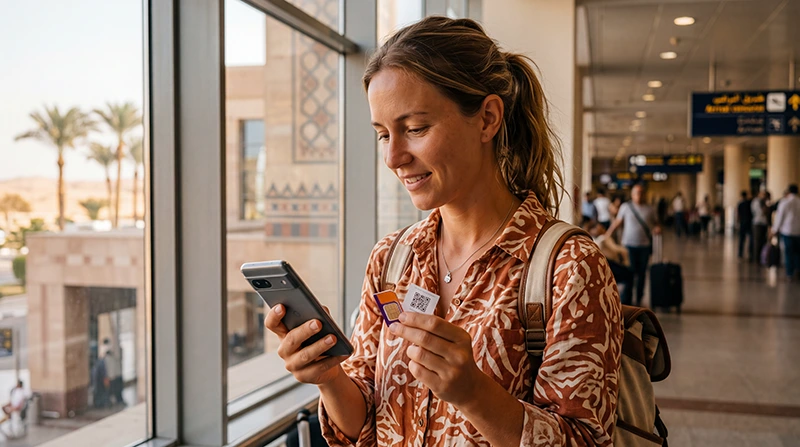

Tourist comparing local SIM card and eSIM options for Egypt

Local SIM vs eSIM in Egypt: Which Is Better for Tourists?

If you’re traveling to Egypt, you may be wondering whether to buy a local SIM card after arrival or use a travel eSIM before departure. Both options can provide mobile internet, but they differ in convenience, setup, flexibility and how easily you can keep your regular phone number active.

Whether you’re visiting Cairo, the Pyramids of Giza, Luxor, Aswan, Hurghada, Sharm El Sheikh, Dahab or Alexandria, choosing the right internet option helps you stay connected for maps, taxis, WhatsApp, bookings, tickets and travel updates.

Quick answer: for most short-term tourists, an Egypt travel eSIM is easier than a local SIM card because it can be bought online, installed before departure and used shortly after arrival without changing your physical SIM card.

Top Egypt eSIMs

Local SIM vs eSIM: Quick Comparison

Feature Travel eSIM Local SIM Card
Buy before arrival Yes No
Physical SIM needed No Yes
Airport queue No Often yes
Keep home SIM active Yes Depends on device
Best for short trips Excellent Good
Best for long stays Good Very Good
Setup timing Before travel After arrival

What Is a Travel eSIM?

A travel eSIM is a digital SIM profile that gives your phone mobile data in Egypt. You buy it online, receive installation details, scan the QR code and install it while connected to WiFi.

There is no plastic SIM card, no physical swap and no need to remove your regular SIM.

What Is a Local SIM Card?

A local SIM card is a physical prepaid SIM purchased after arrival in Egypt. It can be useful for longer stays or travelers whose phones do not support eSIM.

However, buying one usually means visiting an airport counter or mobile operator shop, replacing your SIM card and completing setup after landing.

Why Tourists Often Prefer an eSIM

  • Install before departure.
  • No airport SIM card queue.
  • No physical SIM swap.
  • Keep your regular number active.
  • Use WhatsApp with your existing number.
  • Start using mobile data shortly after arrival.
  • Ideal for holidays, resort stays and city breaks.

When a Local SIM Card May Be Better

A local SIM card may be a better option if:

  • Your phone does not support eSIM.
  • Your device is locked to your home carrier.
  • You are staying in Egypt for a long period.
  • You specifically need a local phone number.
  • You are comfortable buying and activating a SIM after arrival.

Coverage Comparison

Both local SIM cards and travel eSIMs use mobile networks in Egypt. Coverage is generally strong in major cities, tourist resorts and popular travel routes.

Destination Expected Coverage
Cairo Excellent
Giza Excellent
Alexandria Excellent
Luxor Excellent
Aswan Very Good
Hurghada Excellent
Sharm El Sheikh Excellent
Dahab Very Good
Marsa Alam Very Good
Remote desert areas Variable

Setup Process: eSIM vs Local SIM

Step Travel eSIM Local SIM Card
Purchase Online before travel After arrival
Installation Scan QR code over WiFi Insert physical SIM
Activation After arrival with Data Roaming ON At shop or after registration
Primary SIM Can stay inside phone May need to be removed
Best setup time Before flight After landing

Can You Keep Your Home SIM?

With an eSIM, yes. Most Dual SIM smartphones allow you to keep your regular SIM active while using the Egypt eSIM for mobile data.

  • Use the eSIM for internet.
  • Keep your home SIM for calls.
  • Receive SMS verification codes.
  • Continue using your normal phone number.
  • Keep WhatsApp linked to your existing number.

With a physical local SIM card, keeping your home SIM active depends on whether your phone supports two physical SIMs or a physical SIM plus eSIM.

Does WhatsApp Work with Both?

Yes. WhatsApp works with both a local SIM card and an eSIM as long as your phone has internet access.

Your WhatsApp account remains linked to your existing phone number unless you manually change it. You do not need a new WhatsApp account.

Calls and SMS

NoveSIM travel eSIM plans are mobile data only. They do not include a local phone number, voice calls or SMS.

You can still make internet-based calls using WhatsApp, Viber, FaceTime, Messenger, Telegram, Zoom or Google Meet.

A local SIM card may include a local phone number depending on the package you buy.

Recommended eSIM Phone Settings

Setting Recommended Value
Mobile Data Egypt eSIM
Calls Primary SIM
SMS Primary SIM
Data Roaming ON for the eSIM
Network Selection Automatic
Automatic Data Switching OFF
APN data.esim if required

APN Settings for Egypt eSIM

Most phones configure APN settings automatically. If manual setup is required, use the following:

Field Value
APN data.esim
Username Leave blank
Password Leave blank
Authentication None

How Much Data Do You Need?

Travel Style Recommended Data
Weekend trip 1–3 GB
One-week holiday 5–10 GB
Two-week Egypt trip 10–20 GB
Nile cruise and beach holiday 10–20 GB
Remote work 20 GB+

Typical Data Usage

Activity Approximate Usage
Google Maps navigation 5–10 MB per hour
WhatsApp messages Very low
WhatsApp voice calls 30–50 MB per hour
WhatsApp video calls 250–500 MB per hour
Instagram browsing 100–300 MB per hour
TikTok 500 MB–1 GB per hour
YouTube HD 1–3 GB per hour

Which Is Better for Cairo and Giza?

For Cairo and Giza, an eSIM is usually more convenient because mobile data can be ready shortly after arrival. This is helpful for airport transfers, taxis, maps, hotel messages and visiting the Pyramids.

Which Is Better for Hurghada and Sharm El Sheikh?

For Red Sea resort holidays, an eSIM is also convenient because it works outside hotel WiFi zones. You can use it for excursions, diving centers, beach trips, taxis and WhatsApp.

Which Is Better for Long Stays?

For longer stays, local SIM cards may be worth considering, especially if you need a local phone number or plan to use very large amounts of data.

For short holidays and typical tourist trips, an eSIM is usually easier.

Common Mistakes

  • Buying an eSIM without checking phone compatibility.
  • Using a carrier-locked phone.
  • Forgetting to enable Data Roaming.
  • Selecting the wrong SIM for Mobile Data.
  • Deleting the eSIM after installation.
  • Trying to install the eSIM without WiFi.
  • Waiting until arrival to decide how to get online.

What If Your eSIM Does Not Work?

  1. Check that the Egypt eSIM is turned ON.
  2. Select the Egypt eSIM for Mobile Data.
  3. Enable Data Roaming.
  4. Restart your phone.
  5. Turn Airplane Mode on for 30 seconds.
  6. Keep Network Selection on Automatic.
  7. Set APN to data.esim if manual setup is required.

Related Egypt Guides

FAQ

Is an eSIM better than a local SIM card in Egypt?

For most short-term tourists, yes. An eSIM is easier because it can be installed before arrival and does not require a physical SIM swap.

When is a local SIM card better?

A local SIM card may be better for longer stays, phones without eSIM support or travelers who need a local Egyptian phone number.

Can I keep my regular SIM card with an eSIM?

Yes. Most Dual SIM phones allow you to keep your regular SIM active while using an Egypt eSIM for mobile data.

Does WhatsApp work with an Egypt eSIM?

Yes. WhatsApp works normally and keeps your existing phone number.

Do I need Data Roaming enabled?

Yes. Most travel eSIMs require Data Roaming to be enabled on the eSIM line.

What APN should I use?

If manual setup is required, use data.esim.

Final Recommendation

For most tourists visiting Egypt, a travel eSIM is the better choice because it is easier to buy, install and use without changing your physical SIM card. A local SIM card can still be useful for longer stays or travelers who need a local number. If you want convenience, flexibility and mobile data ready shortly after arrival, an Egypt eSIM is the simplest option.

Browse Egypt eSIM plans here.

Scroll to Top