
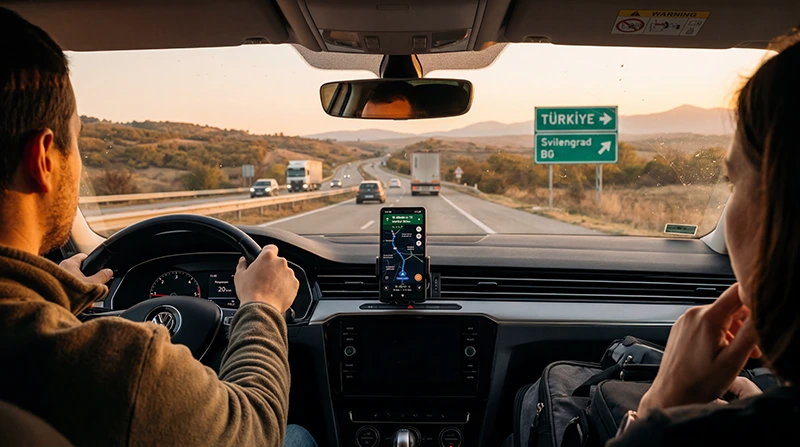

Travelers using mobile internet during a Bulgaria to Turkey road trip.

Internet on a Bulgaria to Turkey Road Trip in 2026

A Bulgaria to Turkey road trip crosses from an EU member state into a country outside the EU Roam Like at Home area. A connection that works at domestic or EU rates in Bulgaria may incur different charges or stop after the Turkish border.

The safest setup is to check home roaming, prepare a Turkey-inclusive eSIM and download the complete route before departure.

NoveSIM travel eSIM plans are data-only and do not provide a Turkish or Bulgarian number, conventional calls or SMS. Messaging and internet calls work through data.

Quick answer: keep Bulgarian or EU data until the border, select the Turkey eSIM only when its coverage applies, and allow automatic partner-network registration after crossing.

Top Turkey eSIMs

Why the Border Changes Your Roaming Conditions

Bulgaria participates in EU Roam Like at Home for eligible EU and EEA customers, subject to the home plan and fair-use policy. Turkey is outside that regulated area. A provider may sell a separate Turkey pass, charge non-EU roaming rates or block data until a pass is selected.

Read the home operator’s current Turkey tariff before travel. Do not assume that proximity to the EU border changes Turkey’s status.

Recommended Dual-SIM Setup

StageData lineImportant setting
Driving in BulgariaEligible home roaming or Bulgaria planMonitor the allowance
At the borderPrepare Turkey eSIMDisable automatic switching
After entry to TurkeyTurkey-inclusive eSIMEnable roaming for that travel line
Return journeySwitch only after coverage changesKeep both home-line roaming and costs controlled

Crossing the Border Without Accidental Charges

  1. Stop safely before changing phone settings.
  2. Turn off mobile-data switching.
  3. Disable data roaming on the home SIM if Turkey is not included.
  4. Enable the Turkey eSIM and select it for mobile data.
  5. Turn on data roaming for the travel eSIM.
  6. Allow automatic network selection several minutes to register.
  7. Test a normal web page before continuing.

Main Border Routes and Connectivity

Road travellers commonly use Kapitan Andreevo–Kapıkule or other crossings selected for the itinerary. Queues, buildings and concentrated users can affect speed. Save passports, vehicle documents, accommodation details and route instructions offline; border procedures must never depend on a live connection.

After entry, the phone may briefly retain a Bulgarian signal near the frontier or search between available networks. Check the network name before using substantial data.

Navigation to Istanbul and Beyond

Main roads usually provide better coverage than remote or mountainous routes, but tunnels, cuttings and handovers can interrupt streaming or calls. Download Turkey maps, fuel stops and the Istanbul destination before leaving Bulgaria. Keep automatic selection enabled unless registration remains stuck.

APN and Network Handover

If the Turkey eSIM shows signal but has no internet, confirm that it is the data line, roaming is enabled and the APN is correct. For NoveSIM the APN is data.esim. The APN is not a Turkish domestic operator APN merely because the plan uses a Turkish partner network.

Toggle aeroplane mode and restart before attempting manual selection. Do not delete the eSIM while waiting for network registration.

How Much Data to Reserve for the Drive

  • Maps and messaging use relatively little data.
  • Live traffic and frequent route changes add consumption.
  • Video streaming and cloud backup can exhaust a small plan.
  • Hotspot use by passengers may increase demand sharply.
  • Keep a reserve for delays, diversions and the return journey.

Emergency and Offline Preparation

Mobile coverage is not an emergency guarantee. Carry required documents, know the European emergency number 112, follow local requirements after entering Turkey and keep important contacts available offline. Stop the vehicle safely before troubleshooting or changing network settings.

How to Prepare a Travel eSIM for Bulgaria

  1. Confirm that the phone supports eSIM and is carrier-unlocked.
  2. Buy the plan while a stable internet connection is available.
  3. Install the profile before departure when the plan instructions permit it.
  4. Label the home line and travel eSIM clearly.
  5. After arrival, select the travel eSIM for mobile data.
  6. Enable data roaming for that line and disable data switching to the home SIM.
  7. Turn off Wi-Fi and load a map or normal website to test mobile data.

NoveSIM travel eSIM plans are data-only. They do not include a Bulgarian telephone number, conventional calls or SMS, but maps, email, messaging and app-based calls can work through data. Keep the home SIM active only when needed and review its roaming charges.

Coverage, 5G and Hotspot Expectations

Bulgaria’s domestic operators publish coverage maps for technologies including 4G and 5G. Those maps are planning tools rather than promises: terrain, buildings, indoor position, device capability, crowding and network maintenance affect the real result. A travel eSIM may use a partner network defined by the plan, so access is not necessarily identical to a domestic subscription.

5G and hotspot availability depend on the plan, device, partner network, region and local coverage. A stable 4G connection is often more useful than an unstable 5G indicator. Tethering, when supported, shares the data allowance and can consume it quickly through laptop updates and cloud backup.

Safe Connection Checks

  • Confirm the correct line is selected for mobile data.
  • Enable data roaming on the travel eSIM.
  • Toggle aeroplane mode for about 30 seconds.
  • Restart the phone and allow automatic network selection to rescan.
  • For NoveSIM, verify APN data.esim.
  • Do not delete the installed eSIM unless support instructs you to do so.

If service remains unavailable, provide support with the order reference, device model, current location, displayed network and screenshots of the data-line and APN settings. Do not share passwords or complete payment details.

Before Leaving Bulgaria

  • Check live border and road information from official sources.
  • Download maps covering both Bulgaria and Turkey.
  • Save the border crossing and first fuel stop.
  • Confirm the Turkey plan is installed but activated according to its rules.
  • Save insurance, vehicle and accommodation documents offline.
  • Review non-EU roaming charges on every active home line.

Complete these checks while parked and connected. The driver must not operate phone settings while the vehicle is moving.

Signal Near the Border

Phones near a national frontier can see networks from both countries. A device set to automatic selection may attach according to signal and roaming permissions rather than the side of the border expected by the traveller. Check the displayed operator before starting a large download or hotspot session.

When returning to Bulgaria, reverse the setup only after confirming that the Bulgarian or eligible EU/EEA connection has registered. Keep the Turkey line available until the handover is complete, but prevent unintended data switching.

Passengers, Hotspot and In-Car Systems

A passenger hotspot can support a tablet or in-car navigation system when the plan permits tethering. Disable app updates and cloud synchronisation on connected devices. One laptop update can consume more data than hours of ordinary navigation.

Built-in car systems may use their own SIM or the phone’s hotspot. Check which connection is active so an embedded non-EU roaming service does not create unexpected charges.

Driving Beyond Istanbul

If the itinerary continues beyond Istanbul, verify that the plan validity and allowance cover the additional distance and days. Main corridors and cities generally offer a better chance of service than isolated mountain or coastal roads, but no route is guaranteed continuously.

Download the next day’s route every evening. Keep fuel, toll, hotel and emergency details offline, and allow for tunnels or terrain-related gaps without treating each short interruption as an eSIM failure.

Managing Data and Battery During the Trip

Download offline maps, translation packs, tickets and accommodation details over trusted Wi-Fi. Set photo backup and operating-system updates to Wi-Fi only, and choose a lower video quality when the mobile allowance matters. The phone’s data counter is useful for trends, although the provider’s accounting controls the actual allowance.

  • Reset or note the data counter when the trip begins.
  • Review consumption after the first full day.
  • Pause automatic media downloads in group chats.
  • Keep a reserve for airport transfers and delays.
  • Carry a power bank on long travel days.

Weak signal increases battery use because the phone searches and transmits more aggressively. In a confirmed coverage gap, offline navigation and temporary aeroplane mode can preserve power, but remember to reconnect when service is needed.

Using the Home SIM Alongside the eSIM

A dual-SIM phone can retain the home number for incoming messages while using the travel eSIM for data. Label both lines clearly, disable data roaming on the home line unless its terms are understood, and turn off automatic data switching. Calls and SMS on the home number may still incur charges depending on the operator and plan.

Internet-based messaging uses the selected data line and normally keeps the existing account number. Installing a data-only eSIM does not require changing a WhatsApp or similar messaging account number.

Related Articles

FAQ

Does a NoveSIM Bulgaria eSIM include a local number?

No. NoveSIM travel eSIM plans are data-only and do not provide a Bulgarian number, conventional calls or SMS.

Can EU visitors use their home roaming in Bulgaria?

Eligible EU and EEA customers can generally use Roam Like at Home, but the home operator’s fair-use limits and contract conditions still apply.

Is 5G guaranteed with a Bulgaria eSIM?

No. It depends on the plan, partner network, device, provisioning, region and local coverage.

What is the NoveSIM APN?

The NoveSIM APN is data.esim. Username and password should remain blank unless support provides account-specific instructions.

Should I delete an eSIM that does not connect?

No. Check settings and contact support first; delete it only when support explicitly instructs you to do so.

Final Recommendation

Choose the connection according to the trip, device and need for a Bulgarian number rather than relying on one generic option.

Prepare mobile data before departure, keep offline maps and test the selected line after arrival.

Retain the eSIM during troubleshooting and verify the plan’s coverage, validity, hotspot and 5G conditions.

Scroll to Top